ADHDBiS

Your all-in-one Best in Slot gear tracker, loot tracker, and raid companion addon for World of Warcraft: Midnight.

Everything You Need in One Addon

BiS gear lists, real-time loot tracking, upgrade detection, and more — all without alt-tabbing.

🧩

BiS Gear List View

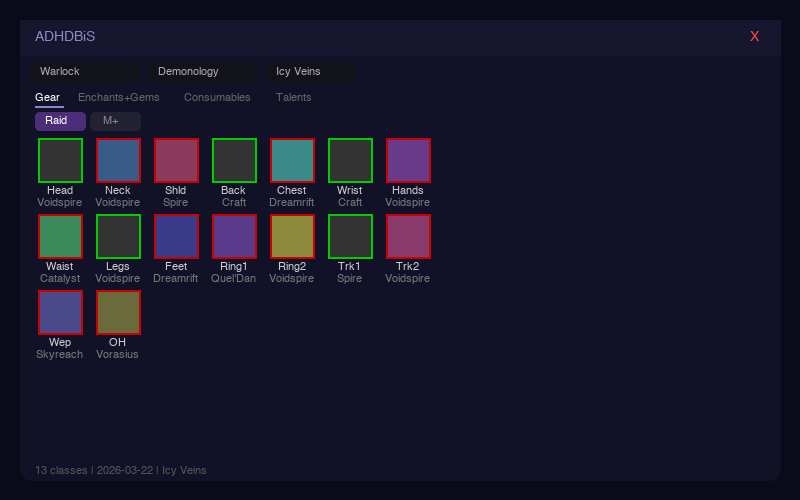
Two-column list view with item icons, names, ilvl display, and drop sources. Overall, Raid, and M+ tabs. 3-state status: green check (BiS equipped), blue bag (in inventory), red X (missing). Filter by status, sort by slot/status/source. Visual progress bar shows BiS completion percentage.

📦

Loot Tracker

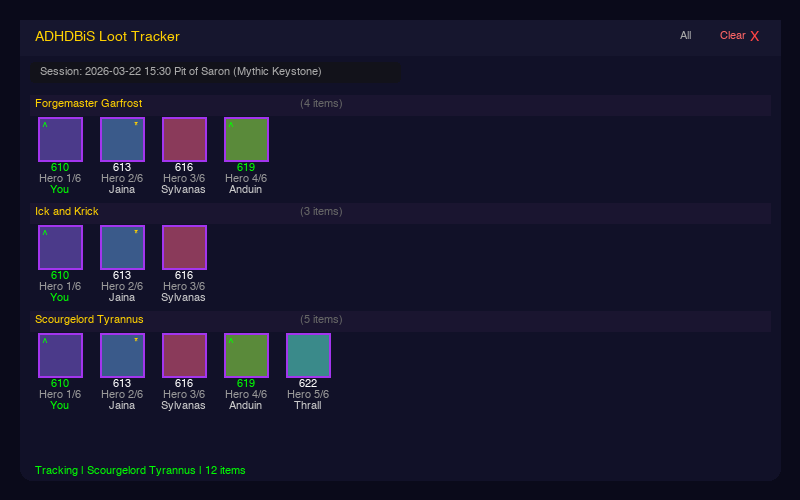
Real-time loot tracking in dungeons and raids. Items appear as soon as they enter the loot roll window, then update with the winner's name. Collapsible boss groups, duplicate item support, bind type indicators, Share and Save buttons for loot reports. Right-click minimap for full Options Panel. Smart upgrade detection only flags items your class can actually equip.

Enhanced Tooltip BiS

Hover any item anywhere — bags, AH, trade, loot, chat links — and see a [BiS] badge with your spec and source. Shows upgrade status: equipped ilvl vs BiS ilvl with arrows, missing/in-bag indicators, and drop source info. Hold Shift to see BiS info for all specs.

Wishlist

Right-click any item in the BiS panel or Loot Tracker to bookmark it. Wishlisted items show a golden star and glow when they drop. View your full wishlist with /adhd loot wishlist.

🔊

Sound Alerts

Hear a fanfare sound when a Best in Slot or wishlisted item drops. Chat message highlights BiS and wishlist drops so you never miss what matters.

💎

Enchants, Gems & Consumables

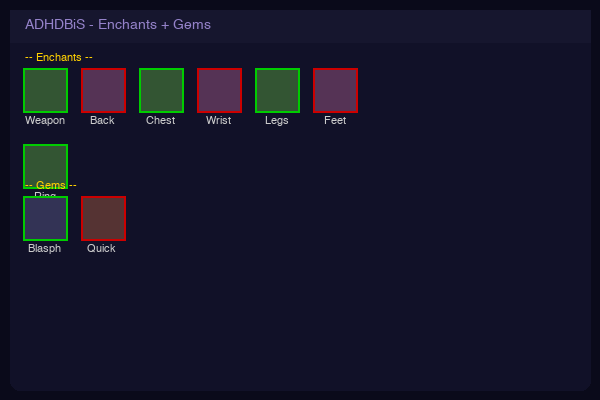
Complete BiS lists for enchants, gems, and consumables in the same icon grid format. Enchants and gems show green when you have them applied. Consumables listed for quick reference.

📋

Talent Builds

Recommended talent builds for Raid, M+, Delves and PvP. Copy import strings and paste directly into WoW's talent UI.

🌐

Triple Source

BiS data from Icy Veins, Wowhead, and Murlok.io (top player data). Switch between sources in-game to compare editorial recommendations with what the best players actually wear. All 13 classes and 40 specs.

🏆

Great Vault Tracker

Visual progress bars for Raid, M+, and Delve vault slots. Weekly reset countdown timer. BiS potential indicator on unlocked slots. Smart pick recommendation tells you which vault slot has the best gear for your spec.

🔍

Gear Overview

Full gear audit: stat priority display, secondary stat distribution with ideal vs actual comparison, Dawncrest tracker with progress bars, upgrade track status per slot, gem socket check, and enchant audit. All in one window with /adhd overview.

📡

LootRadar

M+ upgrade scanner. Snapshots party gear at dungeon start, compares after completion, and detects items that are upgrades or BiS for your spec. One-click whisper or party message to ask for trades. Optional BoP filter hides untradeable items.
See It in Action

Clean, visual interface designed for fast decision-making.

BiS Panel - Icon grid showing Best in Slot gear
BiS List View — Two-column layout with item names, drop sources & 3-state status
Loot Tracker - Real-time dungeon loot tracking
Loot Tracker — Live drop tracking with ilvl, track & player
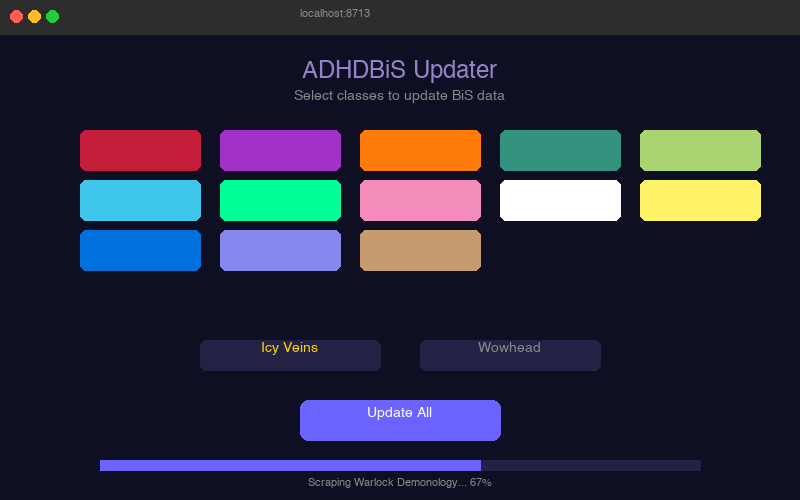
Companion App - Data updater with GUI
Companion App — Update BiS data with one click
Grid View - Enchants and gems
Enchants & Gems — Visual checklist for all enhancements

Commands Reference

Everything is accessible via the minimap button or slash commands.

CommandDescription
/adhd bisToggle the BiS gear panel
/adhd lootToggle the Loot Tracker window
/adhd loot newStart a new loot session (auto-names with instance)
/adhd loot new My RaidStart a new loot session with a custom name
/adhd loot startResume loot tracking
/adhd loot stopPause loot tracking
/adhd loot summaryPrint full session summary to chat
/adhd loot wishlistShow all wishlisted items
/adhd loot soundChange BiS/wishlist drop alert sound (10 options)
/adhd loot debug toggleEnable/disable debug logging for troubleshooting
/adhd loot helpShow all loot tracker commands
/adhd radarToggle LootRadar (M+ upgrade scanner)
/adhd radar modeToggle whisper/party chat mode for LootRadar
/adhd radar bopToggle BoP item filter (hide untradeable items)
/adhd overviewGear Overview: Dawncrest tracker, upgrade tracks, gem/enchant check, BiS comparison
/adhd tooltipToggle BiS info on item tooltips (for users who prefer other BiS addons)
/adhd versionShow current addon version
/adhd minimap hideHide minimap button
/adhd minimap showShow minimap button
/adhd minimap resetReset minimap button to default position

Item Controls

Click — Open Adventure Guide  •  Shift+Click — Link item to chat  •  Right-Click — Toggle wishlist  •  Shift+Right-Click — Copy Wowhead URL

How to Install

Up and running in under 2 minutes.

1

Download the Addon

Download the ADHDBiS addon zip and extract it into your World of Warcraft/_retail_/Interface/AddOns/ folder.

2

Run the Companion App

Download and run the ADHDBiS Updater for your platform. Double-click opens the GUI. For terminal/CLI mode use --cli flag.

3

Reload & Play

Type /reload in WoW, then /adhd bis to open the BiS panel. The minimap button gives you quick access to everything.

Download

Get the addon and companion app for your platform.

Addon

ADHDBiS Addon

The WoW addon itself. Extract to your AddOns folder.

Download Addon (.zip)
Windows

Companion App — Windows

64-bit Windows. Double-click for GUI, or run adhdbis-updater.exe --cli in terminal.

Download .exe
macOS

Companion App — macOS (Apple Silicon)

For M1/M2/M3/M4 Macs. Double-click for GUI, or ./adhdbis-updater-mac-arm64 --cli

Download (ARM64)
macOS

Companion App — macOS (Intel)

For older Intel-based Macs. Double-click for GUI, or ./adhdbis-updater-mac-amd64 --cli

Download (Intel)
Linux

Companion App — Linux

64-bit Linux. Run chmod +x first. GUI default, --cli for terminal.

Download (Linux)

Version 1.8.1 • Compatible with WoW: Midnight (12.x) • All classes and specs supported

View All Versions & Changelog on GitHub

Support the Project

ADHDBiS is free and open source. If it makes your WoW experience better, consider supporting continued development.

Buy Me a Coffee PayPal

Every contribution helps keep the project alive and updated for new WoW patches.